
Rosetta Check
Version 3.0macOS App · Apple silicon · Apps + Components + Tools
Find every Intel dependency that still needs Rosetta: installed apps, hidden components and plugins, and standalone command-line Tools from macOS and package managers.
One Apple silicon readiness score covers all three inventories. Rosetta Check reads executable headers and code signatures locally, shows what needs attention, and never runs a discovered Tool.


Backed by a community catalogue tracking more than 28,000 Intel Mac apps, components, and Tool packages.
£6.99, one-time purchase · No subscription · No ads · No user tracking
What’s happening with Rosetta?
In 2020, Apple announced the transition from Intel processors to Apple silicon. Rosetta was designed to ease this transition by automatically translating Intel-based apps for use with Apple silicon. Rosetta will remain available throughout macOS 27, but starting with macOS 28, Rosetta functionality will only be available for certain older, unmaintained games that rely on Intel-based frameworks.
There’s plenty of time — but only if you know what’s on your system. Rosetta Check gives you the full picture in seconds.
Read Apple’s official guidance on Intel-based apps and Rosetta →
macOS 26.4
Apple begins showing notifications when you launch Intel-based apps. The countdown starts.
macOS 27
Last macOS version with full Rosetta support. Your window to prepare.
macOS 28
Rosetta functionality limited to certain older games. Intel-based apps will no longer work.
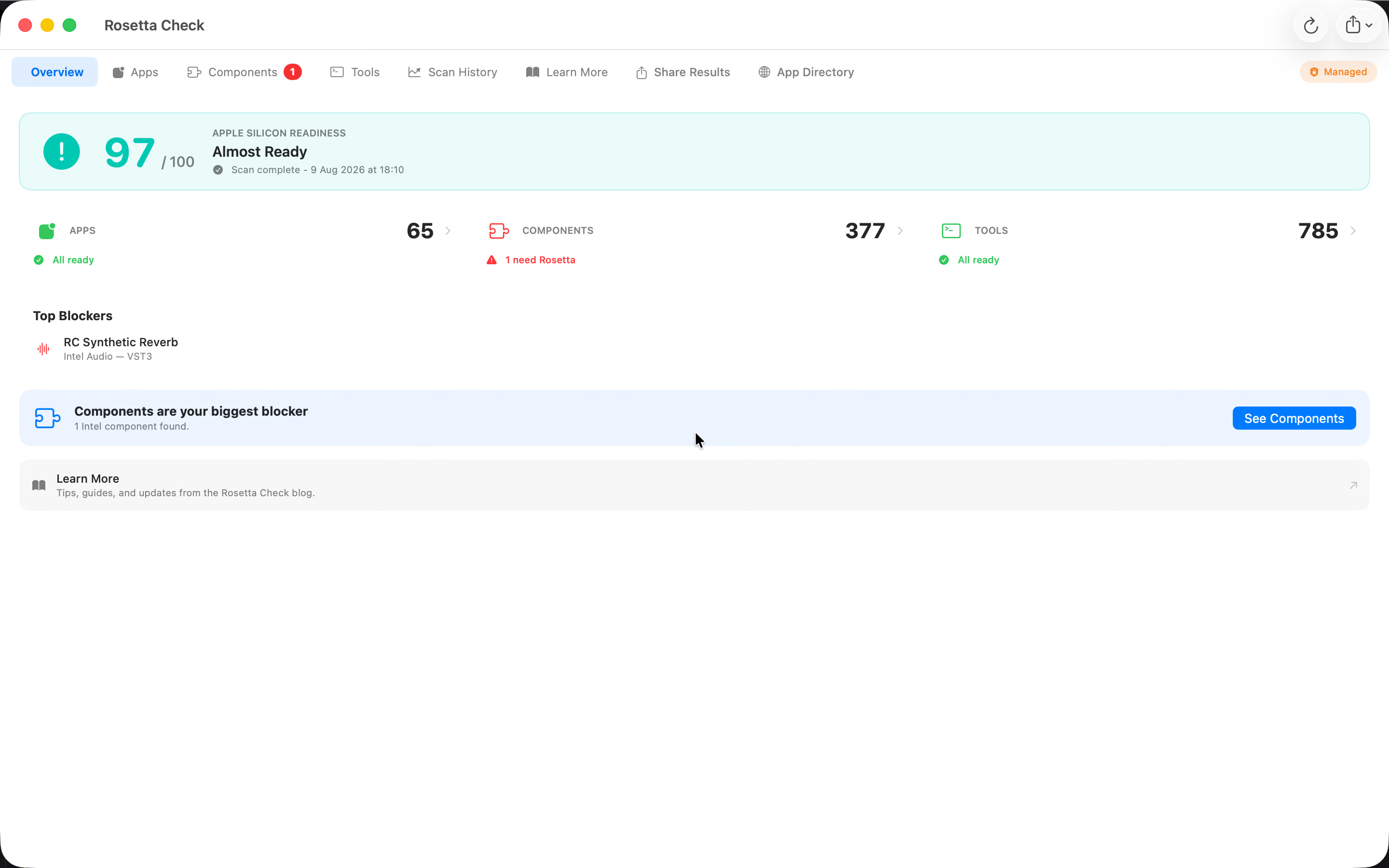
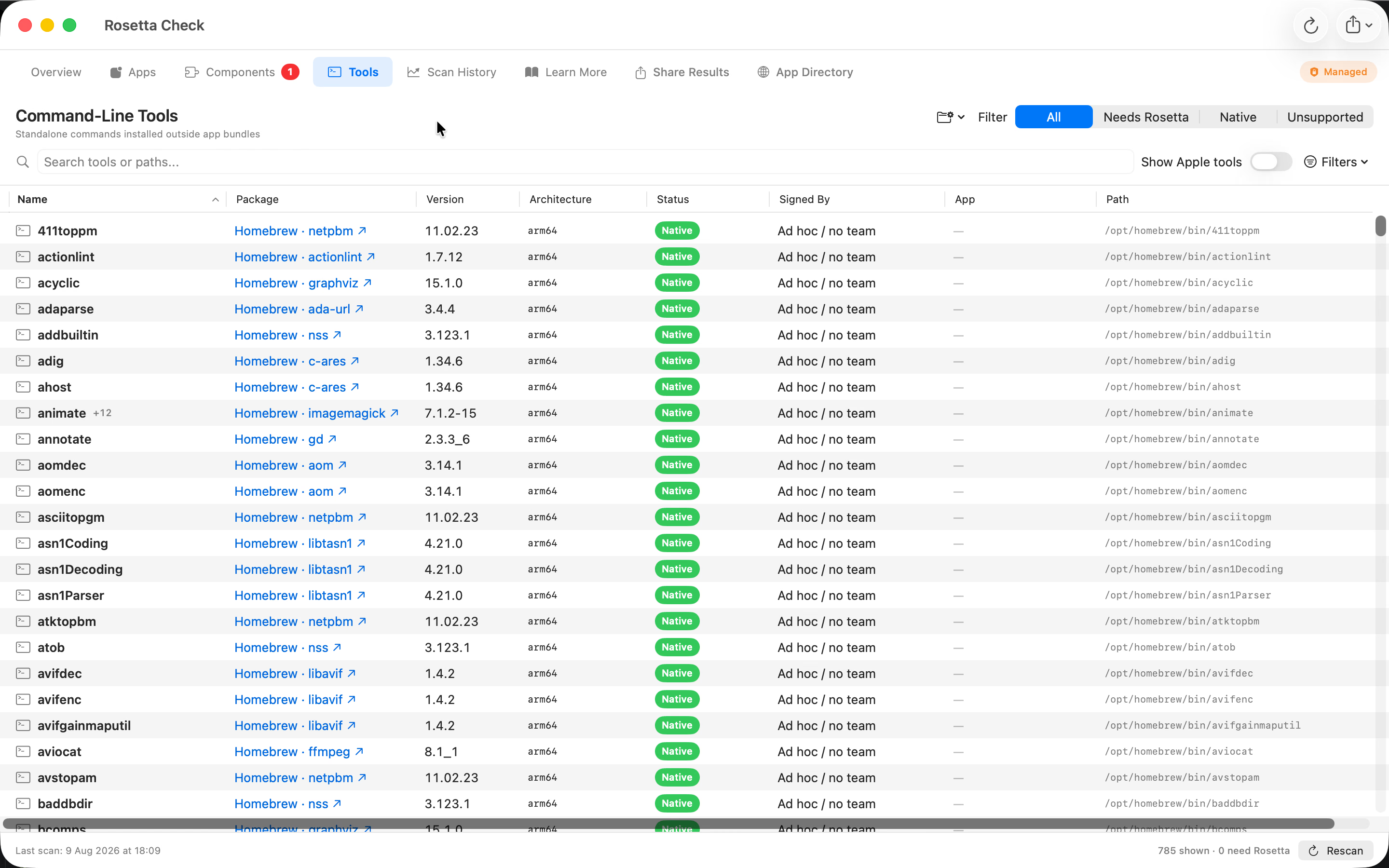
Command-line Tools are now first-class readiness blockers
Rosetta Check now audits common macOS, Homebrew, and MacPorts command locations, plus folders you choose. It groups aliases by their real binary and shows package, version, architecture, signer, related app, and update information without executing a Tool.
Executable-only audit
Reads Mach-O executable headers directly and excludes libraries, scripts, and unrelated build artifacts.
Package-aware results
Connects commands to Homebrew, MacPorts, Nix, signed products, or the app that supplied them.
One readiness score
Apps, hidden components, and Tools contribute to one result with separate checked and blocker counts.
Private by default
Scanning stays local. Optional sharing excludes paths, usernames, file contents, and unmanaged Tools.
Plugin and component scanning for Photoshop, Pro Tools, Logic Pro and more
Rosetta Check 2.0 goes beyond the apps in your Applications folder. It walks every audio, video, photo and 3D plugin folder on your Mac, plus the embedded helpers and XPC services hidden inside otherwise-native app bundles, and tells you exactly what will stop working when Rosetta 2 is removed.
Adobe Photoshop & Lightroom
Detects Intel-only Photoshop plugins (filters, panels, extensions) and Lightroom extensions that haven’t been ported. Surfaces vendor, version and install path so you know exactly which one needs updating.
Avid Pro Tools (AAX)
Scans every AAX plugin in your Pro Tools install for Intel-only builds. Old EQs, compressors, reverbs and instruments that never got an Apple silicon update are flagged with the same Intel/Universal/Apple silicon badges you already trust for apps.
Apple Logic Pro & GarageBand (AU)
Identifies Audio Units that lack Apple silicon support across every per-user and system Components folder. VST3 and CLAP plugins for Ableton, Studio One, Bitwig and Reaper are detected too.
Final Cut, Premiere, Blender, Cinema 4D, Maya
FxPlug effects for Final Cut Pro and Motion, Premiere extensions, plus 3D plugins for Blender, Cinema 4D and Maya. System extensions, Camera Extensions (virtual cameras), and login items are also scanned.

The Components tab
Every plugin grouped by host: AAX under Pro Tools, AU under Logic, VST3 under Ableton, FxPlug under Final Cut, Photoshop extensions under Photoshop. Toggle “Only Intel” to get a focused replacement list.
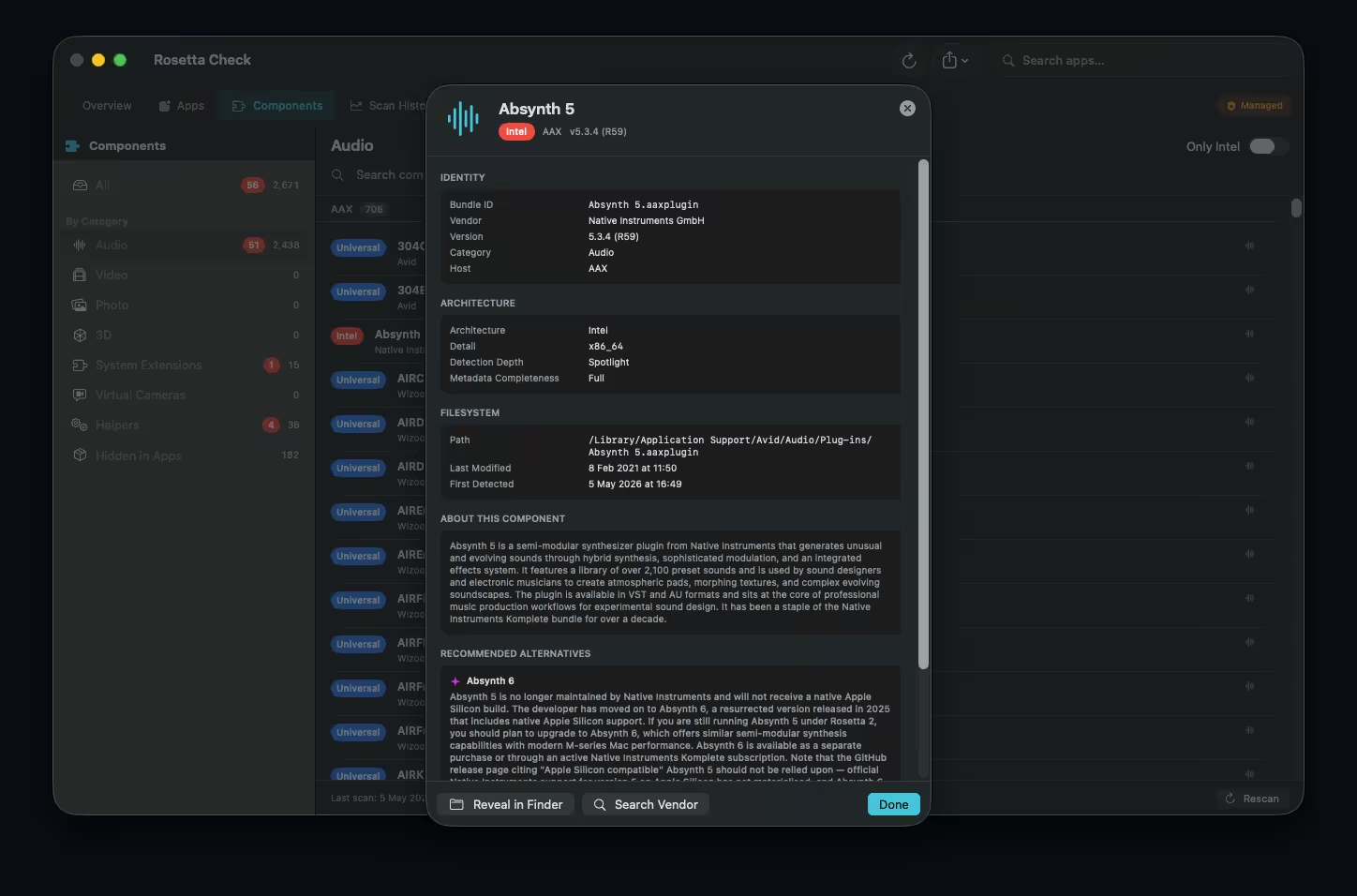
Component detail with AI alternatives
Tap any plugin to see architecture, vendor, version, install path, detection depth and a one-tap “Search Vendor” link. AI-generated alternatives from the RosettaCheck community help you find a native replacement.
Total Mac Readiness score — one percentage covering apps and plugins.
Live plugin monitoring — a Spotlight watcher fires within seconds when you drop a new VST3, AAX or AU into a plugins folder.
Deep bundle inspection — reads every embedded Mach-O inside Universal apps to surface Intel XPC services, helpers and login items hiding inside otherwise-native bundles.
Hidden in Apps view — jump from any app’s detail card straight to the embedded plugins, frameworks and helpers it ships.
Components CSV / JSON export — ships side by side with the apps export and is picked up automatically by MDM collection scripts.
Five new MDM keys — component monitoring, deep inspect, category filtering, grant prompting and readiness weights. All v1 keys still work.
Rosetta Check 2.0 is available now on the Mac App Store, and existing v1 users get the update automatically. Prefer the cutting edge? Join the TestFlight beta.
Everything you need for the journey
More than a scanner — Rosetta Check brings apps, hidden components, plugins, and command-line Tools into one readiness audit, with clear next steps for each blocker.
Apps + Components + Tools
Audits installed apps, plugin and component folders, embedded app helpers, and standalone command-line Tools without executing discovered software.
One Readiness Score
One score on Overview covers apps, components, and Tools. Separate counts show exactly which inventory still contains Intel code.
AI-Powered Recommendations
For each Intel-based app or plugin, get AI-generated descriptions and native replacement suggestions tailored to your setup.
Readiness Milestones
Track your readiness score and get notified when you hit 25%, 50%, 75%, and 100% native.
Background Monitoring
Persistent menu bar presence with real-time notifications when new Intel-based apps or plugins are detected, installed or removed — two live Spotlight watchers running side by side.
Rich Detail View
AI description, replacement recommendations, impact score, version, architecture, disk size, and distribution source — all in one sheet.
Community Insights
Optionally share anonymous app metadata with the community to power better AI recommendations and see what others are finding.
Colour-Coded Architecture
Apps, components, and Tools are clearly labelled Intel, Universal, Apple silicon, or unsupported.
Export & Share
Export apps, components, and Tools as CSV or JSON. Managed settings control scanning, exports, optional sharing, and readiness weights across a fleet.
See it in action
A native macOS interface for the whole audit: one overview, focused inventories, and history that shows progress over time.
One readiness result
See checked-item and blocker counts for apps, components, and Tools without confusing scan progress with readiness.
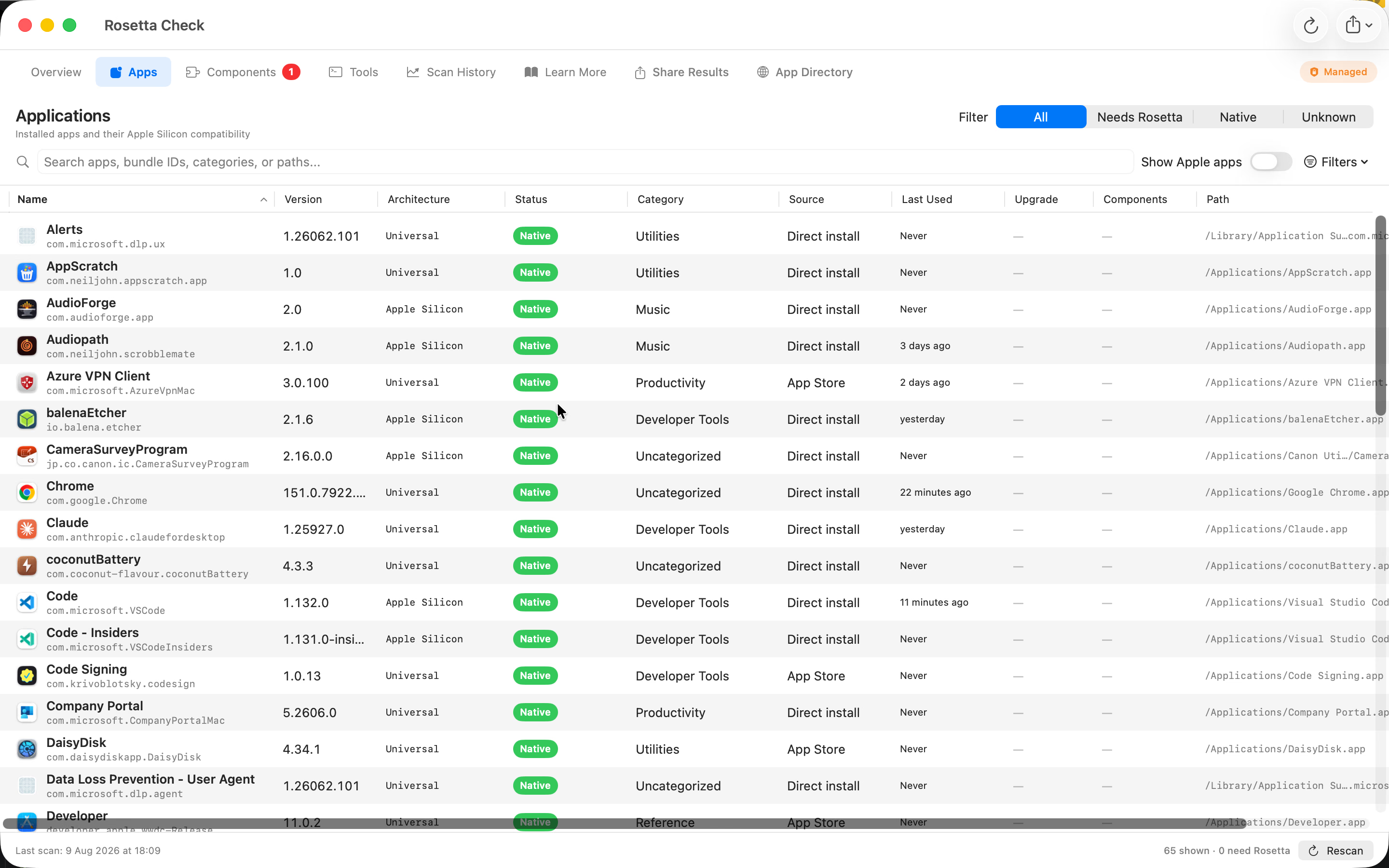
Sortable app inventory
Filter and sort apps by compatibility, architecture, category, source, use, upgrades, and hidden components.
Command-line Tools
Connect commands to package managers, signing identities, aliases, and related apps without running them.
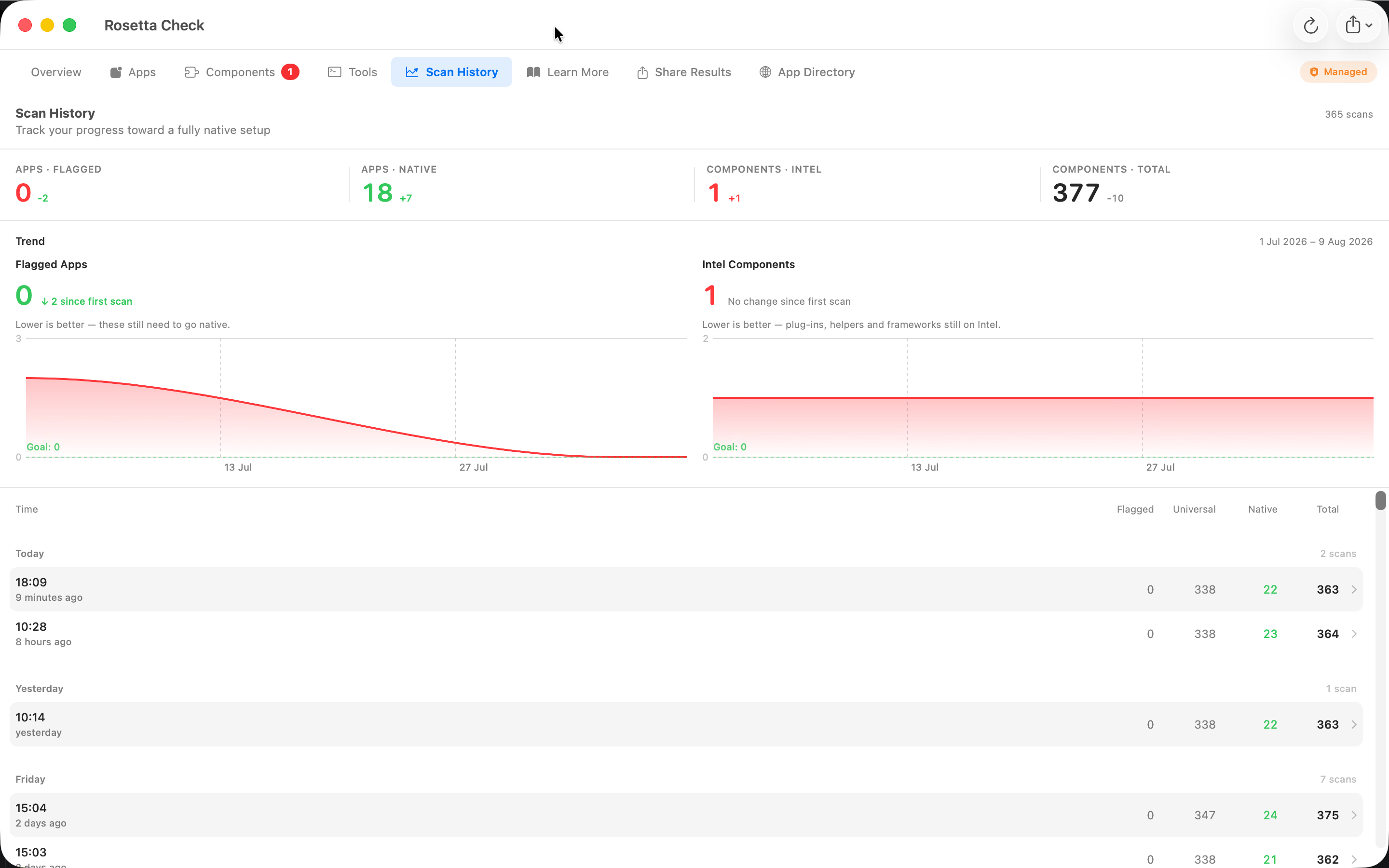
Scan history
Track how app and component blockers change as software is updated or removed.
Three steps. That’s it.
No configuration, no setup wizards, no accounts. Open the app and you’re done.
Scan
Open Rosetta Check. It audits apps, hidden components, and command-line Tools using read-only local checks.
Review
Use the Apps, Components, and Tools tables to filter blockers and inspect package, signing, and architecture details.
Resolve
Get AI-powered replacement recommendations, track milestones to 100% native, and export reports.
Frequently Asked Questions
Quick answers to common questions about Rosetta, Apple silicon, and this app.
Does Rosetta Check scan plugins for Photoshop, Pro Tools and Logic Pro?
Yes — Rosetta Check 2.0 scans every plugin folder on your Mac, including Adobe Photoshop and Lightroom extensions, AAX plugins for Avid Pro Tools, Audio Units (AU) for Apple Logic Pro and GarageBand, VST3 and CLAP plugins for Ableton, Studio One, Bitwig and Reaper, FxPlug effects for Final Cut Pro and Motion, Premiere extensions, plus 3D plugins for Blender, Cinema 4D and Maya. Each plugin is classified Intel, Universal or Apple silicon with the same colour-coded badges used for apps.
Why do plugins matter if my apps are already native?
When Rosetta 2 is removed in macOS 28, an Intel plugin loaded into a native host will simply fail to load. Pro Tools, Logic Pro, Photoshop and most creative apps already ship Apple silicon builds, but the third-party plugins inside them frequently haven’t been updated. Rosetta Check 2.0 surfaces those hidden Intel dependencies, plus the embedded XPC services and helper binaries shipped inside otherwise-native app bundles, so nothing breaks unexpectedly on upgrade day.
What plugin formats are supported?
Audio: Audio Unit (AU / AUv3), VST3, AAX, CLAP.
Video: FxPlug (Final Cut Pro, Motion), Premiere extensions.
Photo: Photoshop plugins and panels, Lightroom extensions.
3D: Blender add-ons, Cinema 4D plugins, Maya plugins.
System: System extensions, Camera Extensions (virtual cameras),
login items, embedded XPC services and helpers inside Universal app bundles.
What is Rosetta 2?
Rosetta is Apple’s translation technology that enables a Mac with Apple silicon to use apps built for a Mac with an Intel processor. Rosetta will remain available throughout macOS 27. Starting with macOS 28, Rosetta functionality will only be available for certain older, unmaintained games that rely on Intel-based frameworks. Learn more from Apple.
Why am I seeing a Rosetta notification on macOS?
Starting with macOS 26.4, Apple shows a notification each time you open an Intel-based app that uses Rosetta. It’s a heads-up that the app will need to be updated for Apple silicon before macOS 28. Rosetta Check lets you see all those apps in one place so you can plan ahead.
What do the architecture badges mean?
Apple silicon — runs natively on M-series chips.
Universal — includes both Intel and Apple silicon code; runs natively.
Intel — requires Rosetta to run on Apple silicon Macs.
Each app also gets an impact score that reflects how heavily it contributes to your overall
readiness percentage, so you can prioritise the apps that matter most.
What macOS version do I need?
Rosetta Check requires macOS 13 (Ventura) or later on any Mac with Apple silicon (M1, M2, M3, M4, or newer).
Does it work on Intel Macs?
Rosetta Check is designed for Macs with Apple silicon, where the transition away from Rosetta is relevant. It will scan and categorise apps on any supported Mac, but if you’re still on Intel hardware the Rosetta transition doesn’t directly affect you.
How much does it cost?
Rosetta Check is a one-time £6.99 purchase from the Mac App Store. No subscriptions, no in-app purchases, no ads. Buy once, use forever.
Support
Need help with a scan, folder access, exports, or a result that does not look right? Email the developer and include your Rosetta Check version and macOS version.
Privacy Policy
Personal data
Rosetta Check does not track you as a user. No names, email addresses, device identifiers, or IP-based profiling. No analytics SDKs, no advertising frameworks, no crash-reporting services. The app includes an optional community-sharing feature (disabled by default) that uploads limited anonymous compatibility metadata — see “Community sharing” below for full details. No personal information is ever transmitted.
What the app accesses locally
The app uses the macOS Spotlight index
(NSMetadataQuery)
to discover installed applications and reads their
Info.plist
metadata. It also reads Mach-O headers and static code-signing metadata for apps,
components, and command-line Tools. Rosetta Check never executes a discovered Tool.
Folder access is read-only and requested only for locations you choose or protected
package-manager prefixes needed to complete the audit.
Network requests
Rosetta Check makes the following network requests:
-
Apple iTunes Search API
(
itunes.apple.com) — used to check whether a native Apple Silicon version of an app is available on the Mac App Store. Only the app’s bundle ID is sent; no user data is included. -
Rosetta Check community API
(
rosettacheck.com) — used to fetch descriptions, replacement recommendations, Tool package information, and community sightings. See “Community sharing” below for the optional upload details.
No other network requests are made. There is no analytics, telemetry, or advertising traffic.
Community sharing (opt-in)
The app includes an optional feature to share your scan results with the Rosetta Check community database. This is disabled by default and must be explicitly enabled in Settings. When enabled, it sends only limited compatibility metadata:
- App name, bundle ID, version, and architecture
- Component identity, version, category, architecture, and host app
- Portable Tool product key, package version, architecture, and bare Intel command names
- Disk size and category (from the app’s metadata)
- macOS version and chip family (e.g. “M2”)
A randomly generated anonymous identifier is used to deduplicate uploads — it is not derived from any hardware or personal information. Rosetta Check never uploads personal information, file contents, Tool paths, usernames, symlink targets, folder grants, Apple system Tools, or unmanaged unsigned or ad-hoc Tools. Native software is reported only when it matches an app, component, or Tool key already tracked by the service; the app never uploads a general native-software inventory.
Native sightings
With Community Sharing enabled, the app can report that a server-tracked Intel blocker now has a native or Universal version. A sighting contains only the tracked bundle ID or Tool product key, version, architecture, and the same random device hash used to prevent duplicate counting. Individual sightings are never displayed.
Third-party services
Beyond the Apple iTunes Search API (operated by Apple Inc.) and the Rosetta Check community API (operated by us), the app does not integrate with any third-party SDKs, analytics services, advertising frameworks, or tracking tools.
Data deletion
All scan data is stored locally on your Mac. Uninstalling the app removes all locally stored data. If you opted in to community sharing, the anonymous app metadata previously submitted is aggregated and cannot be traced back to you. To request removal, contact us.
Contact
If you have questions about this privacy policy, please email [email protected].
Last updated: August 2026
Help translate Rosetta Check
The translation files for the Mac client are now open source on GitHub. Anyone can submit corrections,
refinements or brand-new languages — no Xcode required, just edit a .strings file
and open a pull request.
Approved changes are bundled into the next App Store release and credited in the repo. Spotted an awkward phrase in your language? We’d love a fix.
Ways you can help
- Fix typos or awkward phrasing in an existing language
- Translate newly added strings flagged as missing
- Add a language we don’t support yet
- Review and approve pull requests from other contributors
Ready to reach 100% native?
Start your journey from Intel dependencies to a fully Apple Silicon Mac — with AI recommendations guiding you every step of the way.
macOS 13+ · Apple silicon · £6.99 one-time purchase
Rosetta Check is not affiliated with Apple Inc. Apple, macOS, Rosetta, and Apple silicon are trademarks of Apple Inc.